


Download ABC 3GP Converter – Fast, Free 3GP Video Converter for Mobile Devices
Overview
In today’s mobile‑first world, having the right video format on hand can make the difference between a smooth commute and a frustrating buffering experience. ABC 3GP Converter steps into that gap by offering a dedicated, free tool that transforms any popular video file into the universally‑compatible 3GP format. Whether you’re watching a short clip on a crowded train, sharing a family memory with a friend, or simply need a lightweight video for an older phone, ABC 3GP Converter promises a quick, secure, and high‑quality conversion process.
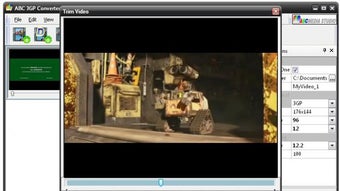
The software is engineered with a clean, drag‑and‑drop interface that eliminates the need for technical know‑how. Just load your source video, pick from a handful of preset resolutions, frame rates, and bitrates, and click “Convert.” The result is a compact 3GP file ready for playback on virtually any Android or feature phone that supports the format. One of the standout extras is the built‑in trimming tool, which lets you cut out unwanted sections before conversion—perfect for creating bite‑size highlights from longer movies or tutorials.
While the application focuses solely on 3GP output, it covers a wide range of source types (MP4, AVI, MKV, MOV, and more) and handles them with impressive speed. Because the program is free, there are no hidden fees, trial periods, or nag screens—just a straightforward utility that gets the job done. For users who value simplicity, speed, and compatibility, ABC 3GP Converter is a compelling addition to any video‑editing toolkit.
Key Features
- One‑Click Conversion: Load, select preset, convert—no complex settings.
- Broad Source Compatibility: Accepts MP4, AVI, MKV, MOV, FLV, WMV, and more.
- Preset Output Options: Choose from common mobile resolutions (240p, 360p, 480p) and frame rates (15 fps, 24 fps, 30 fps).
- Fast Processing Engine: Utilizes hardware acceleration when available to reduce conversion time.
- Built‑In Trimming Tool: Cut start/end points before conversion without needing a separate editor.
- High‑Quality 3GP Output: Maintains visual clarity and audio sync despite file size reduction.
- Free & No Ads: Completely free to download and use, with no intrusive advertising.
- Secure Installation: Signed installer, no spyware, and automatic updates for the latest codec support.
Although ABC 3GP Converter focuses exclusively on the 3GP container, its internal encoder provides a balanced mix of compression and quality, ensuring that even lower‑end devices can playback videos without stuttering. The preset system removes the guesswork often associated with bitrate adjustments, making the tool especially friendly for users who are not comfortable tweaking advanced parameters. The trimming feature is intuitive: a simple slider lets you mark the beginning and end points, and the preview window confirms your selection before you hit “Convert.” This eliminates the need for a separate video editor for quick cuts, streamlining the workflow for busy commuters or content creators who need rapid, on‑the‑fly edits.
Installation & Usage Guide
Getting started with ABC 3GP Converter is as easy as the conversion itself. Follow these steps for a smooth setup on Windows or macOS:
- Download the Installer: Visit the official website and click the “Download for Windows” or “Download for macOS” button. The file size is under 30 MB, making it quick to fetch even on slower connections.
- Run the Installer: On Windows, double‑click the
.exefile; on macOS, open the.dmgand drag the app into the Applications folder. The installer is signed, so you’ll see a standard security prompt—confirm to proceed. - Accept the License Agreement: A short EULA appears; read and accept to continue.
- Finish Installation: The wizard completes in less than a minute. You can opt to launch the program immediately.
- Load Your Source Video: Drag your video file onto the main window or use the “Add File” button. The app automatically detects the format.
- Choose a Preset: Select the desired resolution, frame rate, and bitrate from the dropdown menus. If you only need a quick clip, use the trimming slider to mark start and end points.
- Start Conversion: Click the bright green “Convert” button. A progress bar shows real‑time status, and you can view a preview of the output size.
- Locate the Output: Once finished, the program opens the destination folder automatically. The 3GP file is ready for transfer to your mobile device via USB, Bluetooth, or cloud sync.
For macOS users, the workflow is identical, with the added convenience of native drag‑and‑drop support from Finder. The program also checks for updates at launch, ensuring you always have the latest codec improvements and bug fixes without manual intervention. If you encounter any issues, a built‑in “Help” menu links to a comprehensive FAQ and contact form for direct support.
Compatibility & System Requirements
ABC 3GP Converter is designed to run on the most common desktop environments, making it a versatile choice for both Windows and macOS users. Below are the minimum and recommended specifications:
Windows
- Supported versions: Windows 10 (64‑bit) and later, Windows 8.1, Windows 7 SP1 (64‑bit)
- Processor: Intel Core i3 (2.0 GHz) or equivalent
- RAM: Minimum 2 GB (4 GB recommended for faster batch processing)
- Disk space: 100 MB for installation, plus additional space for output files
- Graphics: DirectX 9 compatible GPU (optional for hardware acceleration)
macOS
- Supported versions: macOS 10.15 Catalina and later
- Processor: Intel Core i3 or Apple Silicon (M1/M2) – native support for Apple Silicon ensures optimal performance
- RAM: Minimum 2 GB (4 GB recommended)
- Disk space: 100 MB for the application, additional space for converted videos
- Graphics: Metal‑compatible GPU for optional acceleration
The generated 3GP files are compatible with virtually any mobile phone that supports the format, including older feature phones, most Android smartphones, and certain iOS devices that can play 3GP through third‑party players. Because the output is a standard 3GP container, you can also embed the files in web pages or email them without additional conversion.
Pros and Cons
Pros
- Free and completely ad‑free – no hidden costs.
- Lightning‑fast conversion thanks to hardware acceleration.
- Simple UI that’s perfect for beginners.
- Built‑in trimming eliminates the need for a separate editor.
- Broad source format support (MP4, AVI, MKV, MOV, etc.).
- Secure installer with automatic update checks.
Cons
- Only exports to 3GP; no other formats available.
- Preset bitrate/size options cannot be customized beyond the provided list.
- No batch processing – one file at a time.
- Lacks advanced editing features like filters or subtitles.
- Mac version lacks native Dark Mode integration (as of the latest release).
Frequently Asked Questions
Can ABC 3GP Converter handle 4K source videos?
Yes, the converter can import 4K files, but because the final 3GP output is limited to lower resolutions (up to 480p), the software will downscale the video during conversion.
Is there a limit on the length of the video I can convert?
There is no hard length limit; however, extremely long videos may require more processing time and generate larger 3GP files, which could affect playback on older devices.
Do I need an internet connection to convert videos?
No. ABC 3GP Converter works entirely offline after installation. An internet connection is only needed for downloading updates or accessing the online help center.
Can I convert videos on a Mac with Apple Silicon?
Yes, the latest version includes native support for M1 and M2 chips, offering the same speed and stability as the Intel‑based Mac version.
Is the trimming tool precise enough for frame‑accurate cuts?
The trimming tool works on a second‑based granularity, which is sufficient for most casual edits. For frame‑level precision, a dedicated video editor would be required.
Conclusion & Call to Action
If you’re looking for a lightweight, free solution to bring your favorite videos onto a mobile phone, ABC 3GP Converter delivers exactly what you need. Its one‑click interface, fast conversion engine, and handy trimming feature make it an ideal companion for commuters, educators, and anyone who wants to share short clips without dealing with complex settings. While the lack of multi‑format export and batch processing may steer power users toward more advanced suites, the simplicity and reliability of ABC 3GP Converter ensure that it remains a top choice for quick, on‑the‑go video preparation.
Ready to experience hassle‑free video conversion? Download ABC 3GP Converter now and start turning your movies, tutorials, and personal recordings into mobile‑ready 3GP files in seconds. Enjoy a secure, ad‑free experience and keep your device’s storage happy!







